
tionisla
By day working in soc/edu/child help and protection.
Nerdy for the rest of the time. Started with computers on an Atari800XL, C64, then Amiga 500. RTFM'd since Linux Kernel 1.1, switched to *BSDs in 2022/23 and now happily using different #RunBSD as main desktop OS'.
Contributed/coded for "UADE - Unix Amiga Delitracker Emulator", a music replay engine of Amiga music files for *nix.
Tinkers with soft/hardware.
Move things and breakfast!
never again is right now!
FUCK CANCER!
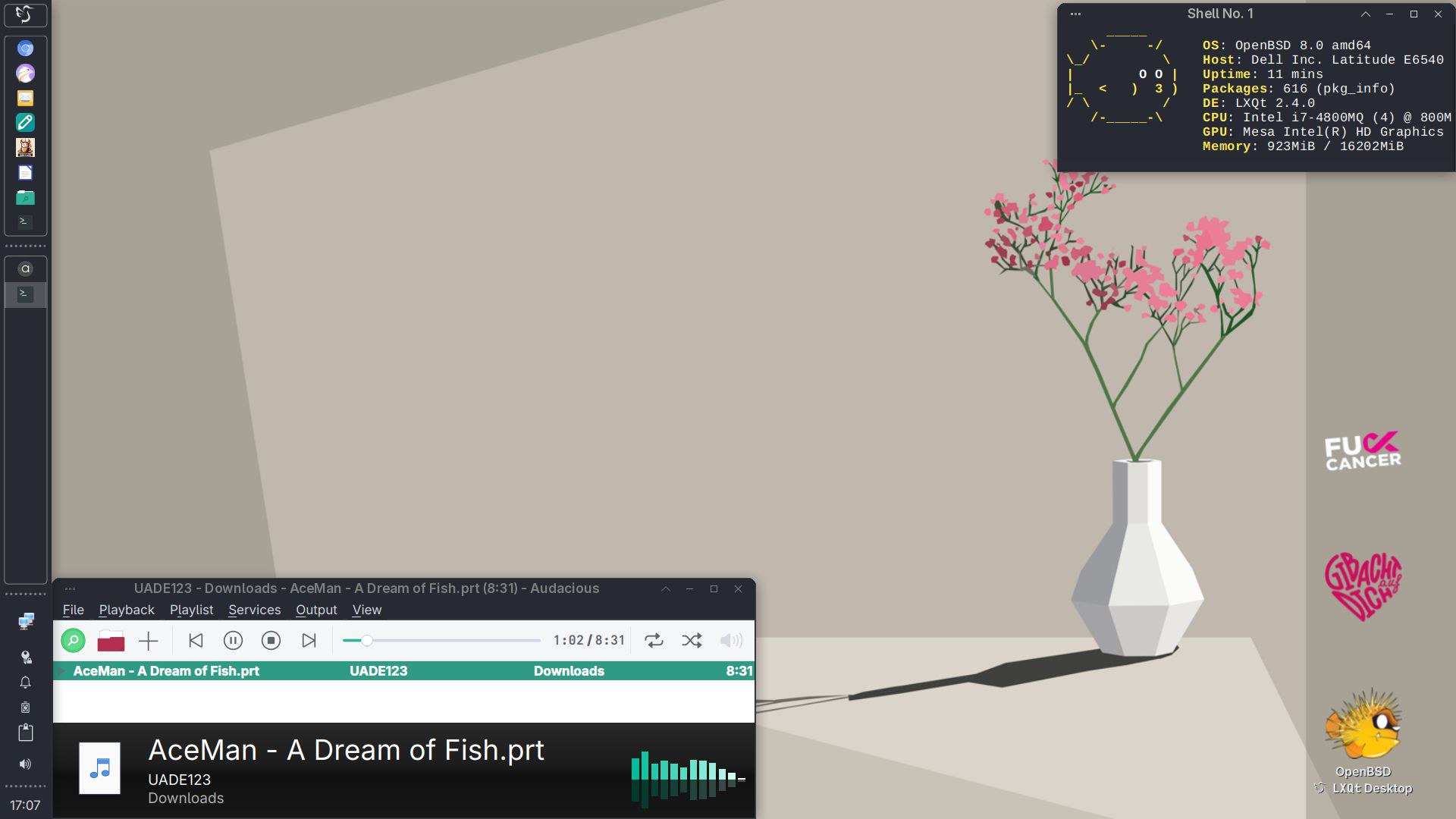
"Tianve" - Dell Latitude e6540 Notebook
- Operating System: OpenBSD 8.0 amd64
- Desktop: LXQt 2.4.0
- Windowmanager: XFWM4
- Qt Version: 6.11.2
- Graphics Platform: X11/xenocara
[1] https://bsd-hardware.info/?computer=887d42919aeb
#runbsd #openbsd #fishlinux #unix #foss #lxqt #desktop #screenshot #shareyourdesktop
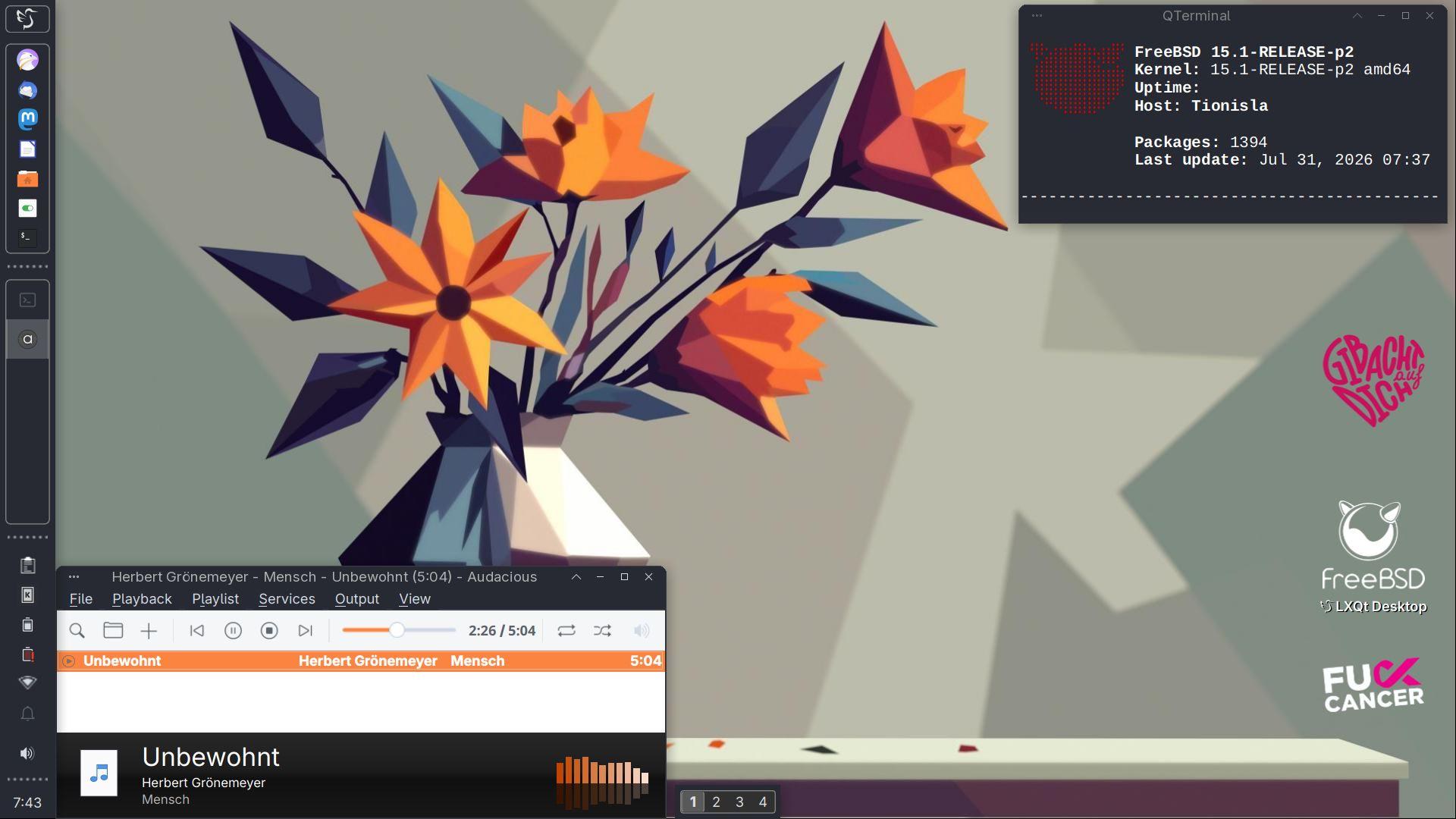
"Tionisla" - Dell Latitude e6540
- Kernel: 15.1-RELEASE-p6 amd64
- Operating System: FreeBSD 15.1-RELEASE-p6
- Desktop: LXQT 2.4.0
- Windowmanager: XFWM4
- Qt Version: 6.11.3
- Graphics Platform: X11/xorg 7.7
[1] https://bsd-hardware.info/?computer=887d42919aeb
#runbsd #freebsd #unix #foss #lxqt #desktop #screenshot #shareyourdesktop


@ricardo@bsd.cafe Thanks! :-)
I think I'm doing ok. Pain management with IBU starts to work, hot water bottle, a big mug of tea and then the rest is just minor annoyances like limbs like lead or an on/off hoarse throat and the other minute a snotty nose .
Hej, I feel I could even work this way, but I'm off duty today, so laying my feet up. Maybe preparing an apple crumble. I have loads of apples this year :-)
sigh seems the flu/covid jab quite knocked me off my socks this year... Freezing, headaches from hell and it seems my body does a speedrun of both now. So I'm slowly taking each step after another.
But I'm happy I did get vaccinated. I don't want that for real and for one or two weeks :-)
@fullywoolly@mastodon.social @MsDropbear42@infosec.space @benjamineskola@hachyderm.io
yes, maybe... although they don't really do anything against their situation but going on debating about it.
Not sure... zood as the ai bros? luring the innocent with false advertising?
and yes, whistling always helps me not to despair completely 🙈
oh, thanks a lot for the hint to chipass!
@ricardo@bsd.cafe
oh, dear...
"I don't want no slop for OS,
There is just one thing I need (and I)
Don't care about GenAI
Underneath the search tree.
I don't need to place my stocks
There upon the dumpster fire,
Sam Altman won't make me happy
With his toy on in code bases
I just want you for my own
More than you could ever know
Make my wish come true
All I want to act'ly coding, is you
You, baby"

When I joined Microsoft, one of the first things I had to do was the Standards of Business Conduct training course. This is something that their DOJ settlement required. That year, they'd just started doing it as a little drama thing, which continued for the next few years. This course was reviewed up to the senior leadership level and included interviews with Nadella and others in the senior leadership team that made it clear that they had seen the show.
In the first season there were two groups, an engineering team and a sales team. Everyone in the engineering team was male. Almost everyone in the sales team was female, with one exception: the team leader was an old white man.
When you've got a company where the senior leadership looks at that and says 'yes, this reflects the company that we aspire to be, I think it's good as something that every single employee of the company will have to watch', it is completely unsurprising that they also approve this kind of public ad.
To their credit, the team responsible did take the feedback onboard and dialled down the aggressive stereotyping later on, but only after people like me had raised it through various internal D&I channels. No one at any layer in the process thought 'maybe the Diversity and Inclusion Council should sign off on this before we make every employee watch it'. No one thought 'how to we structure from the start this so that we aren't reinforcing unhelpful stereotypes?' And that's for things developed in house.
 @baldur@toot.cafe
“Understanding the True Purpose of Generative AI in Ads”
https://ketanjoshi.co/2026/11/02/microsoft-just-gave-us-the-perfect-name-for-ai-thieves-kyle/
> The narrator drops a precise timestamp, like he’s recounting the exact moment of a terrorist bombing inside Kyle’s soul.
@fullywoolly@mastodon.social @MsDropbear42@infosec.space @benjamineskola@hachyderm.io
sigh concerning lo, this is a bit tragic. Maybe and hopefully those two just "slopped" in by accident. 🤷♀️
Anyway, maybe take each step pragmatic and at a time, droppie, but don't despair.
What's the most pressing case and/or the one easiest to replace without too much of a compromise for you here? (I replaced thunderbird with sylpheed/claws mail a while ago, and Ghost- with OpenBSD on my old laptop)
I'd also take things I read on fedi with a grain of salt and especially not sure about that list. Yes, NetBSD said explicitely no and for some this is like the ✨🏆✨Holy Grail* although imo, it is not meant to be the drop-in Linux replacement. and people will run into obstacles with thinking it is. Don't get me wrong, NetBSD is really a great project but not"yet another Linux".
Concerning OpenBSD I have seen it is sometimes also called slop too, because the way they don't like slop is not being dismissive enough for some. FreeBSD hasn't said anything officially yet, yet, so people assume things.
Apart of that, you both are right. The list of options seems to get shorter and shorter. And lo would really hurt.
Again, don't despair.
whistles almost silently the melody of Sir Robin's tune from Monty Pythons Holy Grail ;-)
@DP0@mastodon.social @raster@retro-gaiden.com 🙂👍
It's my goto desktop for a while now. Currently setting it up on an ancient Dell core2duo laptop running OpenBSD
next Person ringing... Next door neighbour is carving out Pumpkins with his children and brought me some of the "innards" for soup.
Then he asked, if I'm there later in the evening... I paused, glanced at the pumpkin and very reluctantly answered "depends..." (with General Akbar in my head screaming: It's a trap!)
We both laughed out loud and he said it's nothing spooky, he'd just come over after he walked with the kids for Halloween, and it' s just because he needs some help with some online form.
@Tionisla@bsd.cafe finished.
A friend just rang. Was just asked to come over for some early coffee and biscuits at 2 o'clock, so any "ghost(bsd) busting" will have to wait for later :-)





 [witchzard 2.0]
I just read this and can't believe how accurate it is qrt my feelings towards some "friends":
There's a special kind of loneliness that comes from being surrounded by people who are perfectly happy with a life that makes you want to crawl out of your fucking skin. They're discussing promotions, degrees, mortgages, retirement plans. They're genuinely excited about things you've spent years trying to escape. It's like being trapped at a party celebrating something you secretly consider a tragedy.
Imagine being the only person in a room who seems to have missed the fucking orientation. Everyone knows the milestones. Everyone understands the assignment. They're comparing how far they've gotten in a story nobody remembers agreeing to participate in.
And you're standing there wondering who the fuck wrote the instructions.
You can become a complete fucking alien without anyone noticing. Show up.
Do your job. Laugh at the jokes. Ask somebody about their weekend. Nobody suspects you're privately observing the whole thing like an anthropologist who accidentally got hired by the civilization they're supposed to be studying.You know the language. You just don't believe in the religion anymore.
There's a particular kind of isolation that comes from being surrounded by people you can talk to but almost nobody you can actually talk to.
Not because they're bad people.
Not because you're better than them.
But because you've stopped wanting the life everyone around you is still working so fucking hard to achieve.And you've become so good at playing along that nobody even knows you already left.


Reminder: #LibreOffice includes no AI features in the software. It doesn't rewrite your content, train algorithms, or share your data. There is zero AI functionality in the app.
Regarding the use of LLMs in the development process, we have a strict policy about this: https://wiki.documentfoundation.org/Development/AI_policy – Contributors who use such tools must be able to explain EVERY changed line of code. We do not accept any "slop".
"Tianve" - Dell Latitude e6540 Notebook
- Operating System: OpenBSD 8.0 amd64
- Desktop: LXQt 2.4.0
- Windowmanager: XFWM4
- Qt Version: 6.11.2
- Graphics Platform: X11/xenocara
[1] https://bsd-hardware.info/?computer=887d42919aeb
#runbsd #openbsd #fishlinux #unix #foss #lxqt #desktop #screenshot #shareyourdesktop
"Tionisla" - Dell Latitude e6540
- Kernel: 15.1-RELEASE-p6 amd64
- Operating System: FreeBSD 15.1-RELEASE-p6
- Desktop: LXQT 2.4.0
- Windowmanager: XFWM4
- Qt Version: 6.11.3
- Graphics Platform: X11/xorg 7.7
[1] https://bsd-hardware.info/?computer=887d42919aeb
#runbsd #freebsd #unix #foss #lxqt #desktop #screenshot #shareyourdesktop