Local timeline

Wenn ich die Heizung jetzt noch nicht anstellen will, muss ich meinen Futon von der Außenwand des Durchgangszimmers an eine Innenwand im anderen Zimmer legen, und damit wieder mal ein paar Möbel umräumen (hab ja zum Glück nur ganz wenige 😉).
Allerdings kann ich dann wohl auch nicht nur das Durchgangszimmer heizen, muss ich dann mal schauen.
Würde ich gar nicht heizen, würde sich die Wohnung auf ~17°C abkühlen, etwas zu wenig.
Letztes Jahr hatte ich sie auf 19°C geheizt.
Internet of Things = konnte ja niemand ahnen, dass ans Internet angeschlossene Kühlschränke möglicherweise gehackt werden könnten 🙄
 @gnarf@social.tchncs.de
Das sind so die Augenblicke, wo ich dem Blog von #fefe sehr hinterhertrauere...


I've reached 100 💯 toots on this account!
Posting from Moshidon on a bigger RAM Android
WebDev:
Is there a tool that allows pasting HTML and CSS in two separate fields and compares them to show, which CSS rules are not used in the HTML file?
Downloaded a template and the CSS seems to me awfully bloated!
(vibe-coded by an "AI-Wizard")
@littler@pico.uninformation.org for now, a DM here or an email (stefano@dragas.it) is the best way. Thank you!
@demo@sludder.vildt.net they'll be announced by the @littlefedi_official - that account will be used only for releases and very important news.
Maybe you can follow it and put a "bell". And yes, it also has a RSS feed.
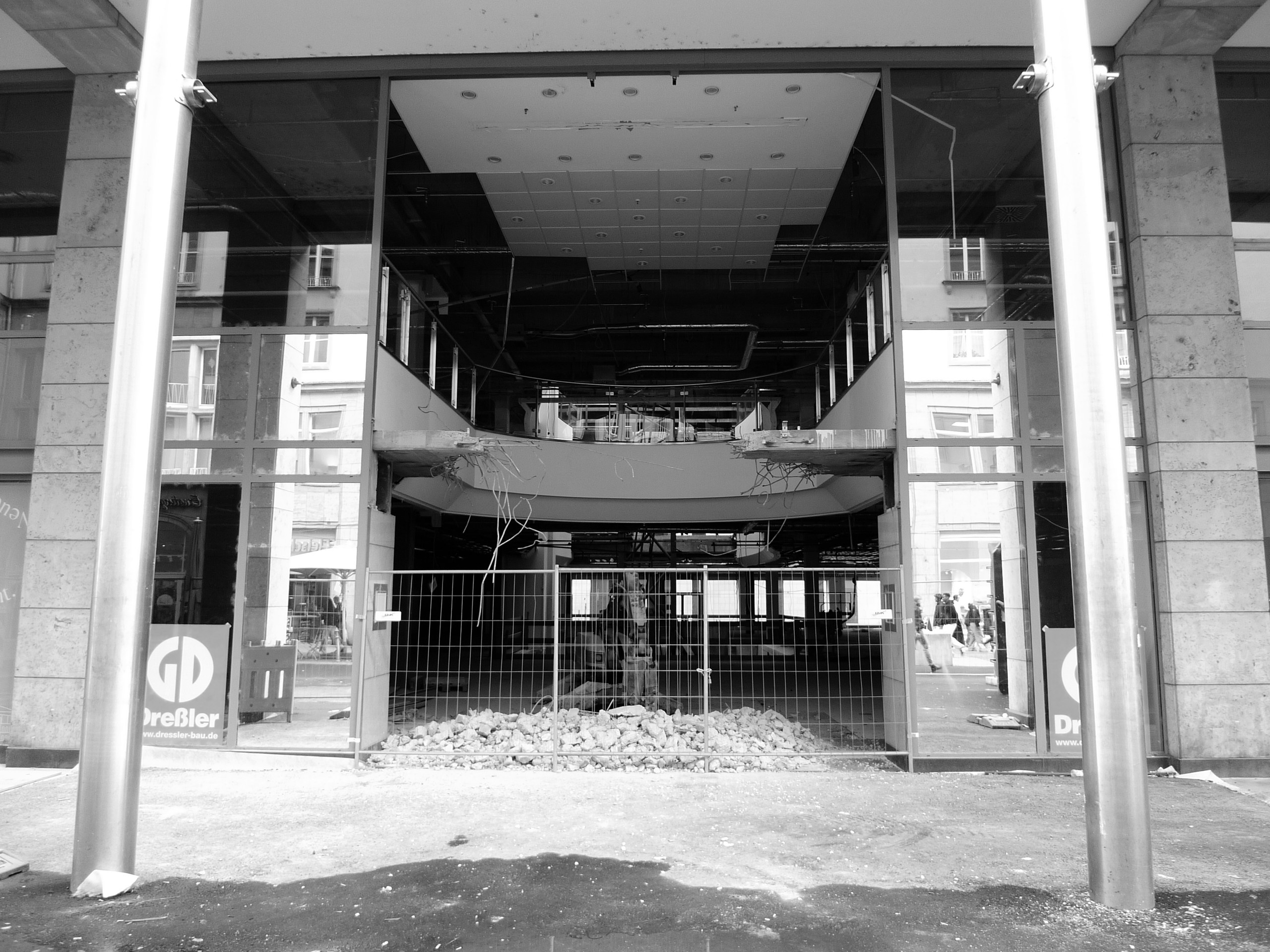
Was wird denn aus dem ehemaligen "C&A-Gebäude"?
Sieht interessant aus, mit so einem "Loch" in der Fassade.
Und die Rolltreppen wurden auch herausgerissen.
Bin ja mal gespannt, was da rein kommen wird.

Hmmm... I wanted to um, remember this write up as more than a bookmark yet less that a full re-blog/re-post, without a favourite.
Ergo this quote-post.
 @cybersecurity@poliverso.org
Your Computer Memory is a Lie
When you first learn to program, memory seems pretty straightforward. You have a bunch of bytes, each with an address. If you want to read or write something, you specify the address, and the computer goes to that place and does your bidding. Sure, some addresses might be reserved for hardware or the operating system, but the general idea is simple: memory is a big array of bytes.
Just like we pretend that a wire is a perfect conductor, the big array of memory model used to be a slight twisting of the truth. On a modern computer, however, it is almost entirely a lie. The address you use probably isn’t a physical address. The data you read might not come from RAM at all. Even if it does, it might be sitting in one of several caches. And if you follow the rabbit hole far enough, you discover that your SSD is arguably just another level in the memory hierarchy.
The Need For Speed
The fundamental problem is that processors have gotten much faster than memory. A modern processor can execute several instructions per clock cycle, but accessing ordinary DRAM can take hundreds of cycles. If the processor had to wait for RAM every time it needed data, much of that impressive computing power would go to waste.
The solution is caching. Keep copies of frequently used data in smaller, faster memories closer to the processor. Most modern desktop processors have at least three levels of cache. The L1 cache is tiny but extremely fast, and often split between instructions and data. L2 is larger and somewhat slower, while L3 is even larger and usually slower as well.
Things get interesting with multiple cores, as is often the case these days. Typically, each core has its own L1 and L2 caches, while several cores share an L3 cache. But that’s not universal. Some processors share L2 caches between cores. Others have multiple L3 caches, each serving a group of cores. The exact arrangement depends on the processor architecture.
One important detail: caches don’t generally work byte by byte. They transfer and track blocks called cache lines, commonly 64 bytes on modern desktop processors. If you read one byte that isn’t cached, the processor generally fetches the entire line containing that byte.
This is why sequential memory access is often much faster than random access. If you read the next byte, there’s a good chance it’s already in the cache. Hardware prefetchers may even anticipate what you’ll need next.
But there can be problems. Imagine two cores modifying completely different variables. If those variables happen to occupy the same cache line, the cores may repeatedly invalidate each other’s copies, wasting time even though they aren’t logically sharing data.
Protocols such as MESI keep the caches coherent, coordinating which core owns a line and which copies are valid. MESI is an acronym for cache line states: modified, exclusive, shared, or invalid. Memory systems must figure out how to keep caches in sync. But coherence doesn’t eliminate the need for synchronization or memory-ordering rules in multithreaded programs. The point is that even our simple byte-addressed memory is secretly operating in larger chunks.
The Address Isn’t Real, Either
So far, we’ve assumed that the address you supply identifies a location in RAM. Usually, it doesn’t. Modern operating systems use virtual memory. Your program sees a virtual address space that the operating system and processor cooperate to map onto physical memory.
The memory management unit, or MMU, translates virtual addresses into physical addresses, typically using page tables. This lets different programs use identical virtual addresses without interfering with one another. It also provides memory protection and allows physical pages to be shared.
Of course, translating addresses takes time. So we add another cache.
The translation lookaside buffer, or TLB, remembers recently used address translations. A TLB hit avoids a potentially expensive page-table walk. Some processors even have multiple levels of TLBs. Unlike the ordinary CPU cache, which generally operates on cache lines, virtual memory usually works with pages, often 4 KB, although larger pages are also supported.
Notice what’s happening. We have caches for data, caches for instructions, and caches for the information needed to locate the data and instructions.
The simple act of reading a variable has become surprisingly complicated.
Not All RAM Is Created Equal
Even if we get through the caches and finally reach RAM, things aren’t necessarily simple. On systems with multiple processors or certain multicore arrangements, memory access can be non-uniform. This is called NUMA, or Non-Uniform Memory Access.
A processor may have relatively fast access to memory attached to its own NUMA node, while accessing memory associated with another node requires crossing an interconnect. Both locations are ordinary RAM, and both may appear in the same address space, but the access times and available bandwidth can differ.
The operating system tries to place memory near the processors using it. Moving a thread to another CPU can therefore change its memory performance, even though the program’s addresses haven’t changed.
And NUMA isn’t limited to traditional multiprocessor servers. Modern systems with chiplets, heterogeneous memory, and technologies such as CXL are making memory topology increasingly interesting.
What If It Isn’t In Memory?
Virtual memory has another trick. A virtual page doesn’t necessarily have to be backed by physical RAM at the moment you access it.
When a program accesses a page that isn’t currently mapped in a usable way, the processor generates a page fault. The operating system decides what to do. Sometimes it simply allocates a fresh page. Sometimes it retrieves data from an executable or memory-mapped file. Other times, the page was moved out of RAM to swap space and must be retrieved. Note that things like executable data are generally immutable, so most operating systems won’t swap them out. They simply trash them and know they can reload the same page later when needed.
This means your program can address data that isn’t presently in physical memory. Naturally, accessing an SSD is much slower than accessing RAM, so excessive swapping can bring a computer to its knees.
Virtual memory doesn’t actually require swapping, though. Address translation and protection are useful even on systems that never move pages to disk.
Your SSD Is Memory, Too
Suppose your program reads a file. You might imagine that the operating system sends a request to the SSD and waits for the data. But if the file was recently accessed, the data may already be in RAM.
Operating systems maintain a filesystem page cache, keeping frequently or recently accessed file data in memory. Writes may also be buffered in RAM before eventually reaching persistent storage.
This makes RAM act like a cache for secondary storage, much as L3 acts like a cache for RAM.
The analogy isn’t perfect. RAM is also the primary working storage for running programs, and anonymous memory isn’t necessarily a copy of anything on disk. But the general hierarchy is clear: registers, CPU caches, RAM, and persistent storage provide progressively different tradeoffs between speed, capacity, and cost.
Even SSDs have their own caches and address translations. Their flash translation layers map logical block addresses onto physical flash locations, hiding wear leveling and garbage collection from the host. Apparently, nobody wants to tell the truth about addresses.
Compressing The Middle
But what if we could make RAM effectively larger without adding more? Compression offers another way to complicate our memory hierarchy. Instead of immediately moving an infrequently used page to disk, why not compress it and keep it in RAM?
Linux has two well-known mechanisms for doing this: zram and zswap. Zram creates a compressed block device in RAM. It’s commonly used as a swap device, allowing pages to be stored in compressed form rather than written to physical storage.
Zswap, on the other hand, is a compressed cache in front of a swap device. When Linux decides to swap out a page, zswap attempts to compress and retain it in RAM. If necessary, pages can eventually be evicted to the backing swap device.
Both trade processor time for memory capacity and reduced storage I/O. Decompressing a page costs CPU cycles, but that can be considerably cheaper than retrieving it from an SSD.
There’s a catch, though. These mechanisms operate through the swap subsystem. When a compressed page is needed again, it must be decompressed into an ordinary page before the program can access it. That means page faults, memory management overhead, and moving data around. But what if compressed memory could behave more like ordinary RAM?
Meta Wants To Change The Rules
That’s the idea behind CRAM, or Compressed RAM, a project presented by Meta’s Gregory Price at the October 2026 Linux Plumbers Conference.
Rather than treating compressed memory as a conventional swap device, CRAM proposes exposing it through a special NUMA node. Linux can then use existing memory-management mechanisms to move pages between ordinary DRAM and compressed memory. The most interesting part is the hardware-assisted compression and decompression, which allows access at much finer granularity than conventional page-oriented compressed swap.
The developers report impressive benchmark results, including read performance that approaches ordinary DRAM in some tests and dramatic improvements over zram for selected workloads.
That doesn’t mean compression has suddenly become free. Writes, compression ratios, hardware requirements, and managing incompressible data all matter. CRAM is still developmental work, not ready for everyday use.
But it illustrates where the memory hierarchy is heading. Instead of simply deciding whether a page is in RAM or on disk, the operating system may choose among ordinary RAM, compressed memory, slower memory tiers, and secondary storage.
The Illusion Is The Feature
Most programmers don’t need to think about any of this most of the time. That’s the point of an abstraction. But when performance matters, the illusion starts to leak. Sequential access can beat random access by enormous margins. Two threads modifying unrelated variables can fight over cache lines. Moving a process between CPUs can change its memory latency. A page that looks like ordinary memory might actually require decompression or a trip to an SSD.
On smaller embedded systems, of course, the picture may be very different. Without an MMU or elaborate caches, memory can look much more like the simple physical address space we learned about in the first place.
We started with an array of bytes. We ended up with a hierarchy of caches, translation tables, NUMA nodes, compressed memory pools, and persistent storage devices, all cooperating to maintain that simple illusion. Amazing how complicated something so simple can be.

"Microsoft erweitert den KI-Spionage-Horror
Wer schon Microsoft (MS) Recall gruselig fand, sollte sich jetzt anschnallen. Die Spionage Software-Firma MS will die Welt mit noch mehr neugieriger „Hilfe“ durch die KI Copilot vergewohltätigen. Copilot soll Zugriff auf das gesamte Dateisystem erhalten! Aber keine Bange, die KI soll auf dem lokalen Rechner laufen – manchmal. Windows kann nämlich auch entscheiden, für kompliziertere Fragen und solche, bei denen die Privatsphäre nicht so wichtig ist (woher „weiß“ MS das?), externe Modelle vom freien Markt zu Rate zu ziehen. Ob es überhaupt möglich sein wird, und wenn ja, wie, diesen Copilot wieder aus Windows heraus zu operieren, ist noch nicht bekannt."
via @PC_Fluesterer@social.tchncs.de
Link:
https://www.pc-fluesterer.info/wordpress/2026/10/11/microsoft-erweitert-den-ki-spionage-horror/
#Microsoft #Microslop #Windows #Copilot #Spionage #Privatsphäre
Dear #littleOne friends,
A new build of littleFedi is now powering this instance!
We've made several changes based on reports from our friends on this instance, feedback from those who have started self-hosting, and code reviews by the Little Computer People.
There are still a few things to integrate, but this will probably be the next build we release (likely tomorrow or on the 14th, two weeks after the previous release).
I'm attaching a non-exhaustive changelog:
- Alt text changed while editing a post from a Mastodon client (Mastodon web,
Phanpy, Elk, Ivory, Tusky and others) was silently dropped. It is now saved
and sent to other servers with the edit. - Alt text of images already attached to a post can now be edited from the web
composer. - When a remote author adds or changes alt text by editing a post, the change
now shows up here too. Before, the post kept its old description, and stayed
hidden for anyone filtering out media without alt text. PUT /api/v1/media/:idcan now clear a description, and refuses media that
is already attached to a post, as Mastodon does. Use the status edit instead.- Alt text is limited to 1500 characters on the server too, not only in the
browser. Longer remote descriptions are cut at the same length. The limit is
reported asdescription_limitin/api/v2/instance. - Media without alt text now report
descriptionasnullin the API, so
clients no longer show an empty ALT badge. - New Favourites page in the web interface, in the main menu, listing the
posts you liked, most recent first. - Paging through
/api/v1/favouritesskipped or repeated posts after the
first page. It now continues from the last post shown, like bookmarks. - When the timeline tabs or the top menu do not fit on one line, they now
show only their icons. Before, some themes cut the last items off or split
them over two rows. - Keep the canonical instance actor URL public in secure and allowlist modes,
fixing a key-fetch deadlock with other authorized-fetch servers. - With split domains,
/api/v1/instancenow reports the handle domain asuri,
and actors carry awebfingerproperty with their canonical handle. - Hashtags can now be followed from the search in Settings > Followed hashtags,
even before any post uses them. Hashtag pages with non-ASCII names, such as
#caffè, now open and follow correctly. - New
[web] redirect_guests_to_aboutsends signed-out visitors from/to
/about, and[web] public_blog_directory = falseputs/blogsand its
sitemap index behind the login. public_local_timeline = falsenow also hides the links to the local
timeline and asks for login on/public/localand when scrolling, not only
on/.- Signed-out visitors could load the federated and bubble timelines through
the scrolling endpoint. They now get the login page. - Moved profiles now show the destination and replace Follow with a link to
the new account. Old posts remain accessible, and cached account data is
refreshed as soon as the move is saved. - Move notifications now show and link to the destination, while the account
name still opens the original profile. Moves by different users stay in
separate notification rows when grouping is enabled. - Cached timelines now pick up new posts when blog publishing is enabled,
without waiting for the page cache to expire. Incoming boosts also update
open timelines through streaming. - Profile bios can now contain up to 5,000 characters in the web editor,
up from 500. - The notifications page now has a Mark all as read button. Clear all still deletes
them. - Follows imported from CSV are now saved before the upload is confirmed and
resume after a restart. Settings and the API show progress, existing follows
and failed lookups. Follow requests and their outgoing deliveries are saved
together, and only one import can run per account. This uses the existing
database schema. - CSV files over
migration.max_follows_importare now rejected instead of
being silently truncated. Set the limit to0to import the whole file. - CSV imports now leave an internal notification when they finish or stop
after a terminal error, with a summary and a link to that import. Retries
do not duplicate the notice; no email or push is sent. - Multiple Mastodon API Fixes
- Replies in the web interface now keep the original post's content warning,
both in the timeline and on the thread page. - Media can be added to a post by dragging files onto the composer or by
pasting an image, as well as with the file picker. Files dropped elsewhere
on the page go to the main composer instead of replacing the page.
"Quereinsteiger:in als Weichenwärter (w/m/d)
Auf Anweisung des Fahrdienstleitenden steuerst du den Zugverkehr über Hebel, Druckknöpfe und Drehschalter auf kleinen und mittleren Stellwerken
Ha ha, möglicherweise auf einem Stellwerk "von 1967 (...) oder noch älter", wie in dem TV-Beitrag gezeigt?
@rqm@0xde501a7a.net this is a moshidon peculiarity. the devs should already have fixed this (incidentally, doing other fixes) in the proxy code. It will be in the next build.
Der @VCDeV@mstdn.social verlangt für die Anmeldung zum Newsletter Name, Vorname und Mail-Adresse.
Natürlich nur, damit sie ihre Lesenden persönlich anreden können.
Eigentlich unnötig, Mail-Adresse wäre völlig ausreichend (Datensparsamkeit).
Die @tazgetroete@mastodon.social lädt ein, ihren "Demo-Newsletter" zu bestellen, ohne "Double-Opt-In", das meines Erachtens (gesetzlich) zwingend vorgeschrieben ist.
Montag Morgen.
Also gut, dann mache ich zunächst mal wieder das mit der Jobsuche und schaue, ob ich mich irgendwo "passend" bewerben kann, damit ich wenigstens dokumentieren kann, dass ich mich beworben habe, um dann bis zur anzunehmenden Absage abwarten zu können.