Post by @francois

@stefano
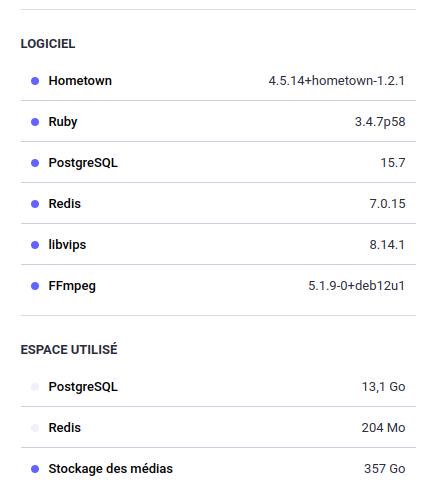
A useful information for all future self-hosting people is the space taken by the database/media.
As you can see on the screenshot taken from polyglot.city the media take a huge space, more than anything else.
Hosting on raspberryPi is nice, but I doubt the 32G SD will be sufficient, unless littleFedi has another way of treating media (like not copying the media locally but referencing them or something).
By the way and talking about raspberries, there is a filesystem available under Linux which was created specially to extend the life of your SD card: f2fs (see here: http://whitehorseplanet.org/gate/topics/documentation/public/howto_ext4_to_f2fs_root_partition_raspi.html )
And of course, if you can avoid SD altogether and boot on something else, all the better.
All recent RP support it, if yours is old you just need to reflash the firmware. The only RP I have which does not support it is a RP2 with a firmware < 1.2 (and no possibility to upgrade).


@francois We have thought about this: littleFedi has 4 options for media:
- "no caching, no proxying": media will be fetched by the user directly from the originating instance
- "proxy only mode" (like this instance): the instance will just proxy the requests, so the media will always be fetched from the instance and served to the user - the originating instance will never see the littleFedi users' requests
- "lazy caching mode": requests will be proxied then the result will be saved locally, so the other requests will be served using the local cache
- "full caching mode": like Mastodon, it will fetch and store local media when they'll be seen by the instance
For both the caching modes, you can store them locally or using an external s3 service and there's a way to migrate from one to the other, without using rclone.
@stefano
Out of curiosity, is there anything you haven't thought of ?
I mean just to save me some time ? 😆
@francois 😆 years of experience and maintaining Fediverse instances. I haven't thought of anything, but I have enough experience to cover the most problematic things I've encountered.

@fasnix @stefano
Guess you've seen Stefano's answer by now.
I don't know enough of the inner working of the system to know whether it makes sense but here are some points to consider:
- converting locally means you have to download them first, potentially quite a lot of storage (think video)
- while it is being converted it takes potentially twice the size
- converting adds to cpu requirement, which we don't want to do on a lesser box
- once you have your .yyy file instead of your .xxx you need to change the attachments references everywhere, potentially
-
- messy
-
- ressource consuming
For these reasons I prefer Stef's solution.
@francois @fasnix video processing is currently null. We just serve the video, but don't process it at all. That's why we don't have thumbnails, for local videos, and trust the originating instances' ones for remote ones.
At some point, ffmpeg will be (optionally) integrated, for high power instances. But it's not considered a top priority, for now.