#ownyourdata

The Little Computer People Present littleFedi: Our First Public Release
"Hi,
We would like to show you a small project we've built and used over the last few years.
It's a Mastodon-like platform that federates using its own protocol and can work even without HTTPS or public Internet access. Many of us have restrictions on our communications, and this project has helped us stay in touch and have our own social network. We'd love to show it to you and hear what you think, because your OwnYourData message really resonates with us."
The Story
And this email sat ignored for weeks.
It came from an anonymous, generic mailbox, with an even more anonymous and suspicious subject. The spam filter had classified it as, well, spam, for other reasons too. Only when I checked the spam folder again, weeks later, did I move it to the Inbox. "Why not?", I thought. And I asked to see what they had built.
There was no way for me to connect to one of their instances. They trusted me and sent me the code which, although fragmented and loosely put together, compiled and ran natively on FreeBSD. But before that: "We only ask you to never say anything, at least until we're ready. We don't want to be visible and, inevitably, judged or attacked. We tried something else before and backed away. Our software isn't high quality and we know it. But it works, for us, and we have fun building it. When it works we're happy, shut away in our rooms, often in the middle of the night. Sometimes, joking, we say we're like little people living inside our computers and that, thanks to this software, we can talk to each other."
At that moment I smiled and thought of a 1985 video game, from my childhood, that was quite revolutionary at the time: "You're like Little Computer People". They liked it. And that's how the group got its name: the Little Computer People.
My first test went well. I was immediately struck by the lightweight interface. "We have old computers, slow hardware. It has to be light. It just has to!". Abundance led to waste. And yet I preferred that light interface, even if incomplete, to many of today's heavy social interfaces, commercial or not. But the code had gaps, pieces held together with duct tape, unfinished parts. They knew it, they had told me, and they were ashamed of it. "You should be proud of what you're doing. It's beautiful", I wrote to them. "We'll never release it."
The battle, if we can call it a battle, was a long one. They weren't far from making it ActivityPub compatible, and there was already a basic draft implementation (tested only with snac). "We don't want to show it, we don't feel up to it. We don't want to step on the toes of others like snac or GoToSocial, who have done a far better job than we have". I tried to convince them, also because the implementation was moving forward and the results were really encouraging. But no, they didn't feel ready. Until, luckily, one of them made a proposal: "We could release it... but we don't want to be seen. We want to stay in our computers and enjoy our code. We don't want to read praise, criticism or comments. We just want to have fun. Would you like to be one of the Little Computer People too? The human who talks to humans while we keep having fun?". I felt honoured and accepted. Explaining, among other things, that Open Source is not a battle. We are not in an arena, where the existence of one solution means crushing another.
This software is not a slight against Mastodon or snac or GoToSocial, but one more choice. Nobody gains. Nobody loses. It's there. It exists. It's something beautiful, one more thing in the world. They agreed, leaving the license undecided and keeping the strictest confidentiality.
The software had no name. But after we came up with the group's name, we affectionately called it our "little social". After the first real, complete ActivityPub federation (with proper tests), the current name was chosen among the alternatives: littleFedi.
"You have more experience... what should we implement?". I thought about it, looked at what was still "in the oven" and what I'd really like to have. I made a list, detailed and very long. But the most important part, for me, was blogging.
Then something happened, and development had to stop. Some devs could no longer work on it. Others weren't able to touch what the others had built. There was only one person who could carry on, albeit slowly, but their computer had broken and they could only communicate by smartphone. They couldn't buy another computer. And yet, a few days later, they received one. Ready to go. With FreeBSD inside.
littleFedi risked stopping right there, with part of the team still against any public release, at least at that point. But sometimes things work themselves out just when you least expect it, and in a short time the "little" humans were back in their computers, having fun, unwinding, creating something beautiful. Until a hot day this summer, when I asked their permission to make my first littleFedi instance public, running on my Raspberry Pi Zero W. One of them was against it at first. Then changed their mind. And I did it, announcing it to the world: https://rpi0w.stefanomarinelli.it/@stefano/blog/2026/07/01/littlefedi-light-yet-complete/
They don't want to interact with the world, but I still decided to show them the comments - all positive. That evening, the private test instance started showing (without me knowing) balloons and streamers every time we logged in. It was a party. And that made my next task easier, leading to the first public instance: littleOne
When I announced it, a lot of friends chose to join the test, and thanks to them a huge number of issues were found and fixed. A huge thank you to them. I acted as a bridge between them and the team, fixing and implementing what I could myself. I'm not primarily a dev but a system administrator, and I prefer not to touch what I don't know. The enthusiasm of the Little Computer People, though, was obvious even without them saying it: bugs were fixed in minutes, hours at most. We merged test branches quickly, so the friends on littleOne could try them.
Towards a Release
The last two months saw a lot of development, but mostly focused on reviewing and cleaning up the code. With one single goal: a first public release. The chosen license, after some thought, is MIT. The point is to give it to the world. This software was born from people who want to communicate with other people, and that's what matters. It's a means, not an end. Because those who don't have freedom dream of freedom without restraints.
There is much more documentation than what we're releasing today, along with tests and internal material that still needs to be reviewed. Some parts describe the project as it was designed, not necessarily as it was later implemented. Others haven't been checked enough yet to be published as reliable documentation. So we chose to release now what's ready: all the code needed to run littleFedi and enough documentation to get started. Not everything has been tested and certified in all the combinations we'd like, but what we're releasing is mature enough to be tried and used.
As of today, littleFedi is available from the downloads page at https://littlefedi.org. There won't be versioned releases for now, just snapshots of the code, both as source and as prebuilt binaries. What matters today is putting the tool in people's hands. Later, when things are ready enough, we'll probably move to good old git, on the BSD Cafe Forgejo. The sources already point there, but that project is currently private (and intentionally empty).
What Is littleFedi
So what exactly are we releasing today?
littleFedi starts from a very simple idea: owning your own social space shouldn't require complex infrastructure. In its basic form it's a single static binary, a configuration file, SQLite and your media on the filesystem. You copy it to a machine and start it. The minimum "certified" target today is my Raspberry Pi Zero W running NetBSD, powered over USB by my switch. It's designed for small, single-user instances, but also for larger ones, with the option to use S3 for media storage (the main space problem of single-user Mastodon instances) or PostgreSQL instead of the built-in SQLite. How large can an instance be, exactly? We don't know yet. The code is there, ready to be tested. We'll leave that for you to find out! You can also already migrate the storage (live), not the databases yet (but there's a partially implemented draft, so that will come too).
There are some rather unusual features, bringing together some of the nice ideas found in other implementations. It's written in Go, and Go allowed us to do something I care about a lot: FreeBSD, illumos, Linux, NetBSD and OpenBSD are not secondary ports of software designed only for Linux. Each one has its own operational documentation. It has a low power mode, lets you schedule a post or set, post by post, an expiration (propagated to other instances). It has a light and simple web interface, yet complete, with no frills, reasonably usable even without JavaScript. Care went into making the PWA pleasant and usable and, even with a few bugs left, it's in my opinion one of the best ways to use littleFedi. And, yes, if you don't want to use its web interface, littleFedi also speaks the Mastodon API: many existing clients can connect directly. It supports emoji reactions. It supports push notifications. Post visibility follows the usual Fediverse model, with two additional variants: Local and Local Unlisted. Because not every post we write needs to leave our instance. And, speaking of federation, it has a fairly clean approach: by default, it federates with everyone. But it also supports blocklists and allowlists. Yes, allowlists: you can choose a list of instances to federate with, and that's it. Only those. Activities to and from all the others will be silently dropped, to give you an experience tailored to your expectations. "Filter bubble?". If you want to call it that. I call it the freedom to decide who your instance talks to.
And there's no need to doom scroll for fear of missing something: timelines are chronological, yes. But there's an optional Catch-up for when you come back after a few hours or days. It lives on a separate page and never decides what shows up in your timeline. If it shows you something, it also tells you why.
But there are too many features to list here, it would become a boring list. The only way is... to try it. Worth mentioning, in my opinion, for how peculiar they are, are two main features: littleMesh and Blog.
littleMesh, Blog and OwnYourData
The first, littleMesh, is an alternative transport mode for federation. Remember the first email, when they talked about their own federation able to work even without public Internet? That idea didn't go away. It evolved into littleMesh. Two littleFedi instances can communicate even behind NAT or CGNAT, with no public address, DNS or inbound ports. All it takes is an external lighthouse. If you also want to talk to the traditional Fediverse, an HTTPS gateway comes into play. ActivityPub, though, stays ActivityPub.
The blog feature is something I had in mind for a long time, and many of the friends who tried it on littleOne loved it. I like how WordPress federates into the Fediverse, but it's a CMS that federates. I wanted something different: a Fediverse platform, with a decent editor, that generates a static site. Simple, BSSG style, but complete and "eternal". HTML files, no need for JavaScript or images. Text is text, and I've always wondered why extra computation should be needed to show…words. When I saw the first draft, I fell in love with it. And I know those sites will still be readable in 10, 20, 30 years. Even without littleFedi. Because social networks are, by nature, ephemeral, but our ideas and thoughts sometimes deserve to stay. And above all, you're not publishing the same thing twice. The post is the same one. It federates normally and, if you choose it as a blog post, littleFedi also generates a static version of it. There's no CMS to keep in sync with the social network.
But littleFedi doesn't want to cage you or hold you back. It supports account migration (to and from other instances), and it also lets you export a full archive with all your content, which can then be imported into another littleFedi instance. Sure, in that case domain and handle will change, but the content will stay, just at a different address. OwnYourData: it doesn't matter which drawer it's in, as long as it's your drawer. And, just like Mastodon, you can self destruct your instance: take it off the Fediverse, politely saying goodbye to the other instances and asking them to remove our keys and content from their databases. Because the Little Computer People don't want to make noise or bother anyone. They just want to communicate, and leave with a smile when it's time.
Ready?
In the last few weeks some friends have taken a look at the code and confirmed what we already knew. It may not be textbook code, but we're releasing it. There are well-engineered parts, others much less so, some to be reworked, many to be analysed, but it's a step. If we aimed for perfection we would never release, and promises are promises.
I'm ready. The Little Computer People are ready. And the code is there, for anyone who wants to try this new communication project. The roadmap is already full of nice things to do, and more will be added. We're not in a hurry, it's not a competition. We want to do things properly.
For your first instance, all you need is a computer and a reverse proxy. Download the source and build it, or grab the prebuilt binary from the downloads page:
./littlefedi init
./littlefedi --config littlefedi.toml
And you're ready to federate with the world.
Happy communicating, and use it well. We're going back into our computers.
Stefano - @stefano@bsd.cafe
 1
❤ 2
💙 1

Welcome to the world of tomorrow!
Yes, exactly. This instance has tomorrow's build date.
That's because littleFedi will be released tomorrow, and I've just made the final builds. They'll be tested on this instance today before being made public.
Not long now...
How littleFedi will be released
The release of littleFedi is scheduled for 1 October 2026.
The release will happen in phases but, from the very first day, it will be possible to use the software in its entirety. Tests and complete documentation are still under heavy revision and will not be ready by then, but we do not want to postpone the release any further.
The code has already been reviewed by several people, who gave us feedback and suggestions I cared a lot about. I want to thank everyone who did it. You know who you are.
There will probably be many bugs because, and this also came out during the reviews, although I already knew it, the quality of the code is not uniform yet.
littleFedi was created by different people, at different times, working on different components and with different levels of experience. And it shows: some parts of the code are of good quality. Others are not.
The reviews of the last few months tried to make things more consistent, but clearly this is not an easy task. In the end, what matters to me is not that the code is beautiful, but that it is sufficiently lean and secure.
So far, the reviews performed have not found security problems serious enough to block the release. Everything else can be fixed along the way.
For the moment, distribution will not happen through BSD Cafe Brew, our Forgejo instance, but directly from the littleFedi website:
You will be able to download a source tarball, or latest, which will simply point to the same tarball. Inside the binaries directory there will also be around 180 precompiled builds for the different platforms and all the possible feature combinations, for example PostgreSQL + S3.
Blog support will be included in all precompiled builds.
Of course, those binaries have not been tested on every single platform. I do not have an AIX/ppc64 machine available, let alone a Windows machine.
But they compile, and at this stage that is enough for me.
For the moment, there will not be fixed releases.
New builds and source releases will be published whenever appropriate, distributed in the same way. The goal is to eventually publish everything on BSD Cafe Brew, our Forgejo instance, but this will happen when tests, complete documentation and the rest are ready too. In practice, at this stage the team prefers to keep more direct control over releases and the management of code, patches and so on.
The license is still MIT, so there is maximum freedom to use and modify the software. This is simply what the team has chosen for now.
The official announcement account will be this one, hosted on the littleOne instance:
@littlefedi_official@littleone.littlefedi.social
https://littleone.littlefedi.social/@littlefedi_official
littleOne will remain online as a test instance. I would not really call it the "official" littleFedi instance, but almost. In the future we may create a larger instance using PostgreSQL, S3 and so on. But this is not really the purpose of littleFedi.
littleFedi is about decentralisation and control over your own data. In an ideal world, everyone would have their own Fediverse software, their own instance, different levels of federation, like Bubbles, which still need some refinement in littleFedi, and allowlists and/or blocklists.
For now, this is just a small step in that direction, adding another alternative to already excellent software such as Mastodon, snac, GoToSocial, Akkoma, Mitra and others.
1 October is close, and the release will be accompanied by a post containing some background information and details that have never been revealed before.
Those details will also help explain some of the technical choices behind the software itself, and why I am the one presenting it to the world. I have not decided yet whether I will publish it here or on my IT Notes blog, but it will definitely be announced.
We are almost there.
It has been a long journey to reach this point, and the best part has not even started yet.
Fasten your seat belts, we are ready to go again!
As promised, the littleFedi source code will become publicly available in about a week.
We will publish a snapshot of the complete source tree, together with some basic instructions to build and run it. Pre-built binaries will also be provided.
This will not yet be a proper littleFedi release. Documentation still needs work, testing needs to be expanded, and several things need to be cleaned up before we can call it that.
But the important part is that the code will finally be out there.
People will be able to read it, build it, experiment with it, start using littleFedi..
Over time, development will progressively move to the BSD Cafe Forgejo, where we will have the usual tools for issues, contributions, releases and collaborative development.
We're not quite there yet.
For now, the first step is simple: open the doors and let people get their hands on the code.
About one more week.
For the first time, littleFedi will be shown publicly
And I have to say, this makes me very happy. :)
A pre-release build will be running on a Raspberry Pi Zero 2 W at Berlin FediDay, where people will be able to see it, try it, play with it, and probably abuse it a little too.
Unfortunately I won't be there in person, because I'll be at EuroBSDCon that same weekend.
But really, what better place than FediDay for the first public appearance of littleFedi?
A huge thanks to @vortex@tldr.nettime.org - Adam - for taking this on, building the demo, testing it independently, and agreeing to respect the temporary source embargo while we complete the last checks before the public release.
I'm especially curious to see how littleFedi behaves once it's in the hands of people who didn't build it.
This is exactly the kind of test I was hoping for.
More details about the presentation:
https://ctalx.c-base.org/fediday-2026/talk/review/AJNLVMPYRSVX3JDHDHYSEZZNSP9KQSYH
Today’s littleFedi updates:
- Strengthened allowlist-only federation: redirects, discovery, deliveries, and hostname handling now consistently respect the policy. (Spoiler alert: there's a reason behind this 😉)
- Fixed boosts for local-only posts, plus a timeline relative-time refresh issue.
- Fixed an Android PWA green-bar issue by letting the manifest update normally.
- Disabling remote media caching now safely clears leftover cache jobs instead of leaving the queue unhealthy.
There are 48 local accounts on this instance.
It may not be extremely active, but SQLite is handling the workload very well. The load is currently close to zero, even though littleFedi is running on a cheap VPS with 2 cores and 4 GB of RAM. It handles federation, lazy media caching, housekeeping and the usual background work
while using around 600 MB of RSS.
That figure represents the whole process footprint - not just the post cache - and includes the Go heap, reusable allocations, buffers and SQLite memory mappings.
When an incoming post is relevant to a local user, littleFedi inserts it into that user’s materialized home feed in SQLite at ingest time. Opening the home timeline therefore requires an indexed read instead of rebuilding it from follows and followed hashtags. A bounded in-memory cache also keeps hot entities, timeline windows and rendered pages ready, while a background warmer refreshes the timelines of recently active users.
Cache misses, restarts and evictions still fall back to SQLite, but the normal warm path is very fast. The bubble timeline also uses the cache, although its cold database path still needs quite a bit of work.
For comparison, my single-user instance on a Raspberry Pi Zero 2 W uses around 60 MB of RSS a few seconds after browsing around.
Go’s garbage collector runs automatically and reclaims unreachable heap objects. Some memory may remain reserved for reuse, however, so RSS does not necessarily fall immediately after a collection cycle.
littleFedi isn’t trying to compete with snac on minimalism - snac is awesome and remains the best solution for many scenarios. The goal is to offer a different experience while remaining usable across a wide range of hardware platforms and operating systems.

littleFedi and your data
Several people have asked me the same thing over the past few days, in different words but with the same question underneath: "if I set up a littleFedi instance, or open an account on one that is already running, what ends up stored somewhere?".
It is a fair question and it deserves a precise answer. So I went back and reread the code, the database schema and the default configuration, and what follows is what I found. Including the parts I do not like, and the parts no fediverse software can solve.
One premise that applies to everything else: littleFedi is a binary running on a server. Whoever administers that server has access to the database. This is true for littleFedi, for Mastodon, for snac, for GoToSocial, for anything. The difference is how much that database holds, and how much of it leaves for the outside world without anyone asking.
The database holds the obvious things: username, display name, bio, avatar, header image, the key pair that is the account's ActivityPub identity, posts, favourites, follows, blocks, mutes, bookmarks, lists, filters.
Then the preferences: theme, interface language, default post language, default visibility, which notifications you want by email, which by push. Functional stuff.
Email is optional. require_email is false by default: on a single-user instance you can leave it out entirely, and on a multi-user one it is the operator who decides whether to require it. If you do provide it, it is used for verification, password reset and the notifications you chose. Nothing else.
The password is hashed with bcrypt. The TOTP secret, if you enable the second factor, is encrypted at rest, not stored in the clear.
And here is something I want to say because it was a deliberate choice: every bearer token is stored as a SHA-256 hash, never in the clear. Session tokens, OAuth access and refresh tokens, application client secrets, password reset tokens, email verification tokens. Anyone who walks off with a copy of the database does not walk off with reusable credentials.
We did a cleanup on exactly this just yesterday. The sessions table had been carrying a legacy token compatibility column for a long time, inherited from an older schema. It held nothing dangerous, because the function that creates sessions was writing the hash into it rather than the browser token, and I checked that this is the only path that leads to an insert. But the guarantee lived in one line of Go, not in the schema. A line of Go can be removed by accident; a column that does not exist cannot. So I dropped the column with a migration, and now there is simply nowhere in the sessions table for a token in the clear to end up.
There is exactly one place where an IP address ends up
The sessions table. When you log in, littleFedi saves the session row with: hashed token, creation date, expiry, User-Agent and IP address.
It serves one purpose: the Settings > Sessions page, where you can see your active logins and revoke them one at a time. It is your data, shown to you. There is no admin screen listing users' IP addresses, and we did not write one on purpose.
Sessions last 30 days and are removed by automatic maintenance when they expire, along with the push subscriptions attached to them.
What is not saved, and what other software does save:
- No registration IP. Until yesterday the registration struct had a field for the IP and one for the User-Agent that nobody ever read: the data arrived inside the function and died there, without touching the database. We took them out. I did ask myself whether it was worth actually recording it, the way Mastodon does, and the answer I arrived at is no. There is really only one use case, the wave of fake accounts created in bulk, and in that case you already have the data: a freshly registered account that is spamming has an open session, and that session holds the IP and the User-Agent. Someone who registers and never logs in is not spamming. On top of that the IP is a weak signal in itself, between CGNAT, mobile carriers and VPNs, while invites, manual approval and email verification are real defences. And unlike the session, which expires in 30 days and disappears, a column like that would stay attached to the account forever: one more entry in the privacy policy, one more target in a breach, and one more thing someone can come asking for with a stamped piece of paper. On a single-user instance it would mean nothing at all.
- No last-login IP on the account. Only the session, which expires.
- No IP history. Close the session and that row is gone.
- The per-IP rate limiter does exist, but it keeps its counters in memory only and cleans them up by itself. It never touches the disk.
What about cookies?
Five, all first-party, all functional:
session (HttpOnly, SameSite=Lax, Secure when you are behind HTTPS, 30 days), pwreset_token (lives 15 minutes during a password reset), locale, theme, appearance.
There is nothing else. There is no analytics cookie because there is no analytics.
Zero third parties
What the code does not contain: Google Analytics, Matomo, Plausible, Sentry, a CDN, a remote font, a third-party script, a pixel, a beacon. And, old-fashioned as it may sound, there is no AI listening in and offering suggestions.
The default Content-Security-Policy is default-src 'self' with a nonce for inline content. Pages load only what your own instance serves. If someone tried to slip an external resource in tomorrow, the browser would block it on its own.
There is not even an update check phoning home. littleFedi does not know you exist and I have no way of finding out.
The only connection to a server of mine is the commercial Big Tech domain list, still empty, (https://littlefedi.org/lists/commercial-bigtech.csv), which is downloaded only if you turn that block on, and it is off by default. It is a download of a CSV of domain names: it sends nothing about you, and you can point the same option at your own list or at a mirror.
The /metrics endpoint is disabled by default.
What about logs?
Here I owe you the whole truth. The access log is on by default and writes one line per request: method, path, status, bytes, duration and remote address.
High-volume, low-value requests (static assets, proxied media, /health, /metrics, /robots.txt, the service worker) are logged at debug level only, so at the default info level they stay silent. But pages are logged.
It goes away with one line:
[observability]
access_log = false
And retention is not littleFedi's call: those lines end up wherever your init system sends them, journald or syslog or anything else. It is the operator who decides how long they stay. In the policy template I ship I suggest 14 days as a starting point.
As for media?
EXIF metadata on uploaded images is stripped by default (strip_exif = true). Orientation is preserved because it is baked into the pixels before the rewrite, so the photo does not end up sideways.
With one honest caveat: the rewrite only happens for JPEG and PNG. GIFs are deliberately left untouched, because rewriting them would flatten the animation, and WebP files are not rewritten because the library I use has no WebP encoder. In practice: if you upload a WebP with GPS coordinates inside, those coordinates stay. I am saying it plainly because it is better to know than to find out. We will look at it later on.
File names are randomised (rename_media = true), so IMG_20250812_my_coffee.jpg does not become a public URL.
And then there is the thing I am proudest of, which is on by default: the remote media proxy.
proxy_remote = true. When an image, an avatar or an emoji living on another server shows up in your timeline, your browser does not contact that server. It contacts your instance, which streams it through. The result is that the remote instance does not see your IP address, does not see your User-Agent, does not see what time you read that post, and cannot use an image as a tracking pixel.
Proxy URLs are HMAC-signed and regenerated on every response, never stored anywhere. And cache_remote is off by default: the stream is passed through and that is it, without keeping other people's media on your disk. If you would rather keep them to cut down on traffic there are the lazy and eager modes, but that is your choice, not a default you find yourself saddled with.
I will add the security headers, which are privacy too: X-Frame-Options: DENY, X-Content-Type-Options: nosniff, Referrer-Policy: strict-origin-when-cross-origin (meaning: when you click a link to the outside, the destination site does not see which exact page you came from), HSTS when you are behind TLS.
But there is also the part no software can fix.
Which is to say, it is time for the uncomfortable section, and it applies to littleFedi just as it does to any other ActivityPub implementation. If someone tells you otherwise, they are selling you something that does not exist.
Public posts are public. When you publish, a copy is delivered to every server that has at least one of your followers, and to every relay your instance is connected to. Those copies are on machines you do not administer. There is no way to call them back.
Direct messages are not end-to-end encrypted. In the fediverse a DM is a post with direct visibility. It sits in the clear in your instance's database and in the clear in the recipient's instance database. Whoever administers either server can read it. Do not use fediverse DMs for anything you would not put on a postcard. This applies to littleFedi, it applies to Mastodon, it applies to everyone. We are thinking about a way to encrypt DMs between littleFedi instances, but that could not apply with other software, and it risks giving a false sense of security.
Followers-only is a convention, not a lock. You tell the remote server "this is for followers only". The remote server, if it is honest, respects that. If it is not, no amount of encryption is going to stop it.
Deleting means asking to delete. littleFedi sends Delete activities to peers and has a queue with retries. If a peer is offline, or uncooperative, that copy stays where it is. That is a limitation of the protocol, not a bug.
And what if I delete my account?
I wrote this part carefully, because it is where a lot of software pretends.
When an account is deleted, a single transaction removes: posts and boosts, polls, options and votes, notifications (both received and generated), mentions, favourites, emoji reactions, bookmarks, link previews, home feed rows, attachments, filters and filter keywords, scheduled posts, push subscriptions, OAuth tokens, sessions, lists, followed tags, featured tags, blocks and mutes (in both directions), follows (in both directions), relays, read markers, personal domain blocks, password resets, email verifications, digest state, MFA recovery codes, exports, imports, reports, generated invites, and finally the account row itself. Counters on other accounts and other posts are recalculated, not left out of sync.
The actual files, meaning media, export archives and import archives, are deleted from storage, whether that is a local disk or S3.
What stays, and I am saying so explicitly:
- Tombstones. A row with a URI, the original type and a date. They exist so that deleted content is not resurrected when a peer offers it back to us. The ones for posts have a configurable retention, 90 days by default. The one for a deleted actor stays indefinitely, but it holds nothing but URI, type and date.
- The moderation log. Administrator actions stay, because an audit log you can delete is not an audit log. The template suggests 2 years.
Deletion has a window: peers are notified first, then it is finalised. There is a deadline past which it is finalised anyway, because at that point the right to erasure of someone who is here outweighs an unreachable peer.
But you can take your data with you.
There is the account export: a ZIP with account.json, the media index and the media themselves. It is served with private, no-store, it has an expiry, and a cleanup job removes it from storage. The template suggests 24 hours and a single download.
There is the import, which accepts the same format. And there is migration to another instance. The archive uploaded for an import is deleted as soon as the import succeeds.
What if you use littleMesh?
Anyone running an instance behind NAT with littleMesh has one more surface, and I want to be precise here too, because it is already written in the documentation.
The lighthouse relays encrypted circuits. It does not read the contents, it cannot impersonate a node, and it has neither the mesh key nor the actor key. But it does see which node IDs open circuits to which, with what sizes and what timings. littleMesh solves reachability, not anonymity. If anonymity is what you need, an onion service is the right tool, not this one.
The HTTPS gateway is a different matter: it is the one terminating TLS for non-mesh servers, so it sees the traffic. That is written in the trust table in the documentation, in plain terms, along with what it can and cannot do.
The default exposure is federation: discovery, inboxes, objects, actors and public media get through. The web interface, the authentication pages, the Mastodon API and the media proxy do not.
Retention defaults, all in one place
| What | Default |
|---|---|
| Sessions | 30 days, then removed |
| Remote posts | 30 days (prune_remote_statuses_after_days = 30) |
| Remote media cache | disabled; if enabled, 720 hours |
| Terminal jobs | 24 hours |
| Post tombstones | 90 days |
| Your own posts | never, unless you ask |
| Moderation log | indefinitely |
| Access log | your system keeps them, not littleFedi |
You can have your own posts pruned automatically, by age and with like and boost thresholds, if you want a timeline that forgets. And there are self-destructing posts with a per-post timer. But those are things you choose, not things I decide for you.
There is something the software cannot do in your place, though
If you open an instance to other people, the code cannot write your privacy policy for you. It cannot decide the lawful basis, the jurisdiction, the subprocessors, the policy on minors, the breach notification timelines.
That is what docs/instance-policy-template.md is for: an operator checklist with a starting retention table and a list of what an honest privacy policy has to cover, namely federation of profiles and posts to independent servers, caching and proxying of remote content, email, push endpoints, logs, moderation records, backups, exports, imports, tombstones, where the data lives and how people exercise their rights. It is not legal advice and does not claim to be.
Moderation, privacy and security contacts, the rules and the terms of service are published from the admin console without restarting anything, and they land on /about, on /terms and in the instance APIs.
In two lines...
...littleFedi collects what it needs to work and nothing more. One IP address per session, shown to you and revocable by you. No analytics, no telemetry, no third parties, no phoning home. We do not know how many of you there are or who you are, and we have no interest in finding out. EXIF stripped by default, remote media proxied by default, metrics off by default, secrets hashed at rest, deletion that actually deletes.
And then there is the fediverse, which is a publishing protocol. What you put on it in public is public, DMs are not encrypted, and deleting is a polite request to other servers. littleFedi does not change that and neither does anyone else. Once you know it, you can live with it perfectly well.

#GoToSocial and #littleFedi keep introducing thoughtful functionality focused on user choice and user empowerment and I'm here for it!
GoToSocial supports importing from previous instance even provides an API for importing non ActivityPub history but both require external tools. littleFedi has built-in backup and full instance restore that seems to be aiming for lower tech know-how. #OwnYourData indeed, hear hear 🍻
 @stefano
@shom @fasnix @madamada Built-in backups of the database, the configuration and, optionally, local owned media, with a manifest and a restore command.
You can fully export all your contents (including posts) and re-import them into another littleFedi instance. It'll be another account with another handle, but you won't lose any of your contents. Your data stays yours.
@shom @fasnix @madamada Built-in backups of the database, the configuration and, optionally, local owned media, with a manifest and a restore command.
You can fully export all your contents (including posts) and re-import them into another littleFedi instance. It'll be another account with another handle, but you won't lose any of your contents. Your data stays yours.
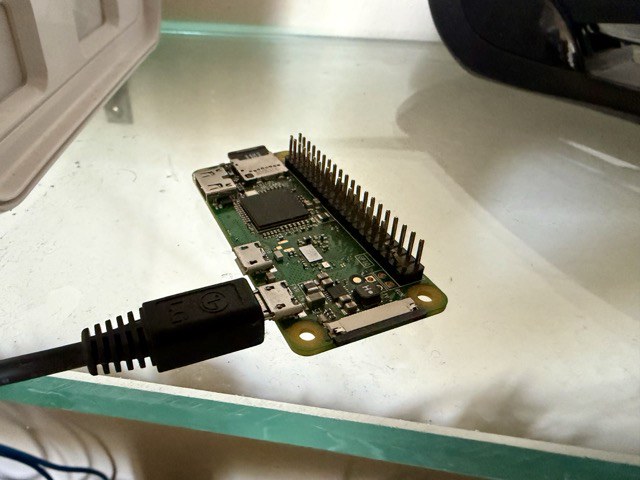
Just a little reminder on littleFedi's efficiency
The instance https://rpi0w.stefanomarinelli.it - with my user @stefano@rpi0w.stefanomarinelli.it - has been running for over a month on a Raspberry Pi Zero W powered by NetBSD.
Under normal operation, it uses 58 MB of RAM, including caches. And it shows no signs of slowness!
I just built the merge with the branch that enables blog themes, including a few default themes. So, I've enabled the blog for everyone. If you want to test it out... it's live! 😃
littleFedi works like a real app on your phone
A few people have asked me how to actually use littleFedi on mobile, so let's clear this up. I use MastoBlaster, for obvious reasons. But you don't need to build anything native - littleFedi is a Progressive Web App (PWA), and that means it behaves like a proper installed app once you set it up.
- You add littleFedi to your home screen like any other app
- It opens full screen, no browser address bar, no tabs cluttering things up
- It works offline for the shell of the app, so a dead connection doesn't just throw a blank error page at you
- You get real push notifications, even when the app isn't open
- Static assets load instantly on repeat visits because they're cached on the device
Just your browser doing what browsers are supposed to do.
Installing it
On Android (Chrome or most Chromium-based browsers): open your instance, tap the menu, and choose "Add to Home screen" or "Install app". On iOS (Safari): tap the Share button, then "Add to Home Screen". That's it - the icon lands on your home screen and from then on littleFedi launches like a native app, in its own window, with its own icon and theme color.
Notifications that actually work
This is the part people are usually most surprised by. littleFedi uses Web Push, so once you enable notifications from the settings page, you get real-time alerts for mentions, boosts, favourites, quotes, follows, follow requests, polls ending, and a few other events - each with its own icon so you can tell at a glance what happened without opening the app. Tap a notification and it takes you straight to the right place, or focuses the app if it's already open in another tab.
This works the same whether the app is in the foreground, in the background, or fully closed. The browser's service worker handles delivery even when littleFedi itself isn't running.
Why it feels fast
Static files - the JavaScript, the icons, the stylesheets - get cached on your device the first time you load the app. On every visit after that, they load instantly from local storage instead of going over the network again, and the cache quietly checks for updates in the background so you're never stuck on stale code. Your actual content - posts, notifications, everything tied to your session - always comes fresh from the server, since that's the stuff that has to be accurate and can't be cached.
If your connection drops entirely, you'll see an offline page instead of a browser error, so it's clear what's going on rather than looking broken.
No extra app needed
If you're on mobile and haven't installed littleFedi yet, this is really the way to use it day to day. It's lighter than many native apps, updates itself automatically, and you're not waiting on anyone to approve a release in an app store. Just add it to your home screen and it stays there, working like any other app on your phone.